hi there!

im unsure whether or not you're doing support still for this code, but im having a bit of trouble trying to figure out where id put in the link for an image background where the solid colors are (im modifying it into a different theme). i know there are tags that kinda point you in the direction of them but im unsure if id have to just paste an image link somewhere or if id have to add a line of code to something

really great work regardless, and im excited to use it <3
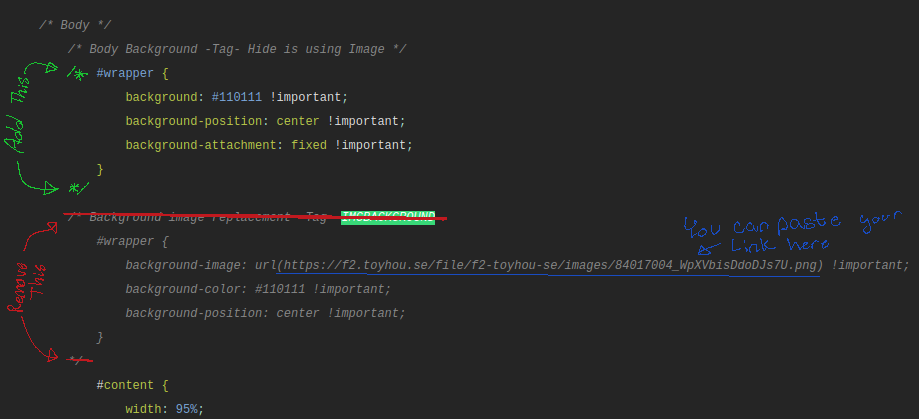
Hi! Yes I am still doing support for this code. I hope I understand your question correctly. 

You can edit the code kinda like this for adding images.

IMGBACKGROUND_Paste_Location.png

I hope this helps somewhat :3


Feel free to Comment/DM me again if you have more questions!

TY this was so helpful (me and my friend were so lost dnbsjdbdkj)
would it be the same for the nav bar? or would that be a different setup?

bcos i do like the image up there and i hope i can keep it while adding my background

It should be the same for it yes :3
I do believe the change for the navbar is so that you can more easily change the size of it.

oh, so i wouldnt be able to get rid of the solid color?
(sorry if thats a dumb question im a little slow efndjn)

i really appreciated the visual btw, i understand better like that <3

you should be able to change the background-color to something like this

background-color: rgba(0,0,0,0) !important;

5 Replies

could i be pinged when the seafoam one is done !??!!! so pretty 

Hi! I’m new to art fight so how could you put this on your profile? Ö

Just making sure, do you have art fight premium? You can't access CSS without it. If you do, CSS is in your settings under profile. The box to enter it should be at the bottom (PC) or middle (mobile) of the page.

oH! I don’t that explains why i couldn’t find an option hehe, maybe next year thanks a lot for replying 🥺