Profile
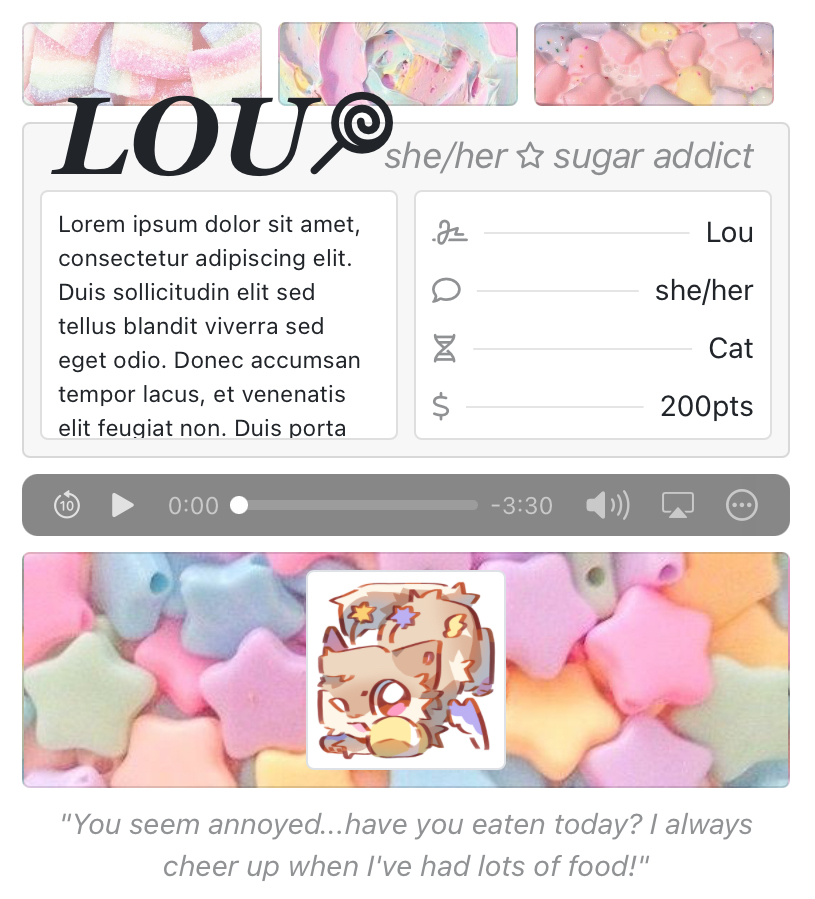
F2U CODE - saccharine
originally a personal code i didn't intend to share but i liked it alot so here it is now!! haha
not really much to say here but i finally figured out how to make a mobile responsive layout! lookat that i'm improving at this coding thing
i feel like formatting the code and adding comments took longer than making the code itself...especially since this wasn't supposed to be public the formatting was especially fucked. uegehe.
i honestly make a new code header i don't like my current one very much anymore
feel free to comment any chars you use this code on...it makes me super happy seeing my stuff being used and i would love to see what people do with this code :00

tos
- feel free to edit to your hearts content
- do not delete the credit, you may move it though
- please do not redistribute my codes
- frankesteining with other codes are perfectly fine
- have fun!
Lou is either the first or one of the first designs I've ever obtained that wasn't designed by me...I adore her so so much... She's going to be two years old in less than half a month did you know? Wow..
Lou is a very bright and upbeat person! She's got a big sweet tooth, although she'll eat just about anything. She can be stubborn and weirdly perceptive at times, but she tries to put a smile on everyone she meets.
<!-- F2U CODE BY NUTTFLOOF - saccharine

     replace all IMAGE_URL_HERE with your raw image links!
     i recommend filegarden.com to host them :]

     music player will have different appearances depending on the browser!
     you can use filegarden aswell to host the audio
     youtube links will not work! you must download the audio and host it somewhere
     refer to this tutorial for more info -> https://toyhou.se/6560537.music-player-tutorial-f2u

     this code uses fontawesome icons!
     you can change them by finding the icons at fontawesome.com and copying the html code snippet in place of any <i class> snippets

     use th.circlejourney.net to see a live preview of the code -->


<!--code start-->
<div class="row no-gutters justify-content-center" style="max-width: 700px; margin: auto; margin-top: 35px">

  <!--left column start-->
    <!--when adding/removing boxes, make sure the last one's class is card flex-fill mb-2 mb-md-0
        the middle and first should be card flex-fill mb-2 mr-2 mr-md-0-->
    <div class="d-flex flex-row flex-md-column col-md-1 mr-2" style="min-height: 50px">

        <!--first one-->
        <div class="card flex-fill mb-2 mr-2 mr-md-0"
             style="background-image: url(

             IMAGE_URL_HERE

             ); background-size: cover; background-position: center">
        </div>
        <!---->

        <!--second one-->
        <div class="card flex-fill mb-2 mr-2 mr-md-0"
             style="background-image: url(

             IMAGE_URL_HERE

             ); background-size: cover; background-position: center">
        </div>
        <!---->

        <!--third one-->
        <div class="card flex-fill mb-2 mb-md-0"
             style="background-image: url(

             IMAGE_URL_HERE

             ); background-size: cover; background-position: center">
        </div>
        <!---->
    </div>
    <!--left column end-->

    <!--main card start-->
    <div class="d-flex flex-column col-md-7">
        <div class="card bg-faded flex-fill p-2 mb-2" style="position: relative">
            <div class="d-flex">

              <!--header-->
                <!--you can manually ajust the position of the text by changing the font-size, along with the top and bottom attributes (or whatever they're called) if you'd like!
                    i recommend you do this for longer names as the text may overlap with the text beside it

                    note: larger numbers in the top attribute will move it downwards, and vice versa
                          smaller numbers in the left attribute will move it left, and vice versa aswell-->
                <span class="text-uppercase"
                      style="font-family: georgia; font-size: 55px; position: absolute;

                      top: -35px;
                      left: 15px">
                    <i><b>

                        name

                    </b></i>
                    <!--icon-->
                    <i class="far fa-star fa-flip-horizontal fa-xs ml-n2"></i>
                    <!---->
                </span>
                <!--header end-->

               <!--text-->
                <span class="faded"
                      style="font-size: 18px; position: absolute; right: 17px; top: 2px">
                    <i>
                        pr/ns<i class="far mx-1 fa-star fa-xs"></i>text here
                    </i>
                </span>
            <!--text end-->

                <!--scrollbox-->
                <div class="card p-2 mr-1 small"
                     style="flex: 1 1 0; min-width: 0; overflow: auto; max-height: 125px; margin-top: 25px">
                    <p>

                        This box scrolls, so feel free to write as much as you'd like. <b>Bold text, </b><i>Italics, </i><u>Underlined text.</u> Lorem ipsum dolor sit amet, consectetur adipiscing elit. Duis sollicitudin elit sed tellus
                        blandit viverra sed eget odio. Donec accumsan tempor lacus, et venenatis elit feugiat non. Duis
                        porta eros et velit blandit dapibus. Curabitur ac finibus eros. Duis placerat velit vitae massa
                        sodales, eget mattis nibh pellentesque.

                    </p>
                </div>
                <!--scrollbox end-->

                <!--basic info box-->
                <!--make sure not to type too much in each section, as it'll double up if you do
                    however, this box scrolls, so you're free to add as many more as you'd like-->
                <div class="card p-2 ml-1"
                     style="flex: 1 1 0; min-width: 0; overflow: auto; max-height: 125px; margin-top: 25px">

                    <!--name-->
                    <div class="row no-gutters align-items-center justify-content-between mt-n1">
                      <i class="far fa-signature faded"></i>
                       <hr class="flex-fill mx-2">
                        <div class="col-auto">

                            Name

                            </div>
                    </div>
                    <!---->

                    <!--pronouns-->
                    <div class="row no-gutters align-items-center justify-content-between mt-n1">
                      <i class="far fa-comment faded"></i>
                       <hr class="flex-fill mx-2">
                        <div class="col-auto">

                            pr/ns

                            </div>
                    </div>
                    <!---->

                    <!--species-->
                    <div class="row no-gutters align-items-center justify-content-between mt-n1">
                      <i class="far fa-dna faded"></i>
                       <hr class="flex-fill mx-2">
                        <div class="col-auto">

                            Species

                            </div>
                    </div>
                    <!---->

                    <!--worth-->
                    <div class="row no-gutters align-items-center justify-content-between mt-n1">
                      <i class="far fa-dollar faded"></i>
                       <hr class="flex-fill mx-2">
                        <div class="col-auto">

                            Worth

                            </div>
                    </div>
                    <!---->

                </div>
            </div>
        </div>

    <!--music player-->
        <div class="d-flex align-items-center mb-2 mb-md-0">
            <audio controls class="flex-fill">
                <source src="AUDIO_URL_HERE">
            </audio>
        </div>
    </div>
    <!--music player end-->

<!--right column start-->
    <div class="card p-2 align-items-center justify-content-center col-md-2 ml-0 ml-md-2"
         style="background-image: url(

         IMAGE_URL_HERE

         ); background-size: cover; background-position: center;">

        <!--icon-->
        <!--if you don't want a transparent border on your image, just remove class="img-thumbnail"
            looks best with square images, but other dimensions should work just fine-->
        <img class="img-thumbnail"
             src="

             IMAGE_URL_HERE

             "
             style="max-width: 100px">
        <!--icon end-->

        <!--credit, do not delete-->
         <a href="https://toyhou.se/nuttfloof"
            class="text-muted">
          <i class="fa fa-code fa-xs faded"
             style="position: absolute; bottom: 10px; right: 5px">
           </i>
         </a>
       <!---->

    </div>
  <!--right column end-->

<!--quote start-->
    <span class="faded mt-2 text-center"
          style="max-width: 600px">
        <i>

            "You can technically type as much as you'd like here, but it'll double up the more you type, so better keep it somewhat short."

            </i>
      </span>
    <!--quote end-->

  </div>
<!--code end-->