
THANKS FOR THE RANDOM NYVERN ART YOOO (or did i owe u something i lowk forgot)
DEERFANGS
Kian/Dani • He/they • 25+ • Chilean • ESP/EN ok
Vgen | Bluesky | Twitter | Deviantart | Carrd | TOS | Trello | Art fight
NOTICE: Replies and commissions/owed art may be slow due to health problems, my apologies! Thank you for your patience!
Hi I'm Kian!
I love characters with long ears 🐇
I'm bad at naming characters
También me pueden hablar en español si prefieren :)
Proshippers DNI
Latest Bulletin
Hello, I recently switched from working on an ipad to a screen tablet and I'm still in the process of getting used to it and because of that I've been working on art very slowly. So if you commissioned me or are waiting on art from me I'm so sorry I'm taking longer than usual! But I promise I'm working on everything as fast as possible and I haven't forgotten anyone's art.
Again, so sorry for the delays! Thank you for your patience 🙇♂️
Featured Character
Latest Comments
This user is not visible to guests.
This user is not visible to guests.
Hello! I'm glad you like how it looks! I'm very bad at explaining things but I'll try!
(Putting it under a spoiler thing because I don't want a long post on my profile lol sorry)
For the tail I add keyframes for when its at the lowest point
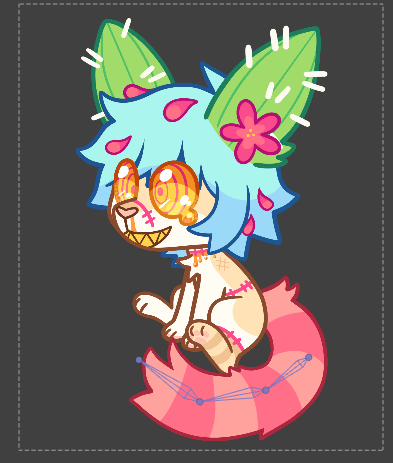
then when it's at it's highest point
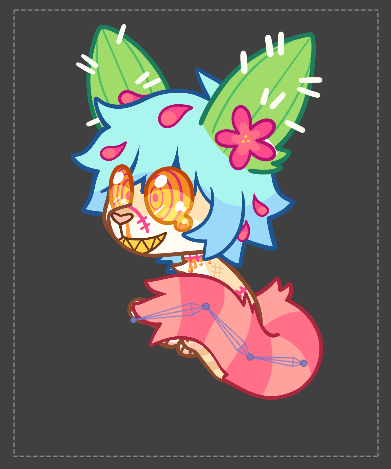
And right in the middle between these two keyframes I add a keyframe where I bend the tip of the tail downwards (I only move the tip, I leave the base of the tail intact because I need it to follow the path going up)
Note: usually I add this keyframe at 1/3 of the distance between the low tail keyframe and the high tail keyframe but because this animation is faster here I have to add it in the middle between those two keyframes
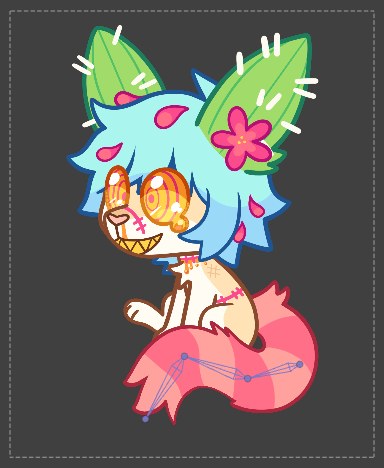
Then I do the same thing for the animation of the tail going down but I bend the tip of the tail upwards for the middle keyframe
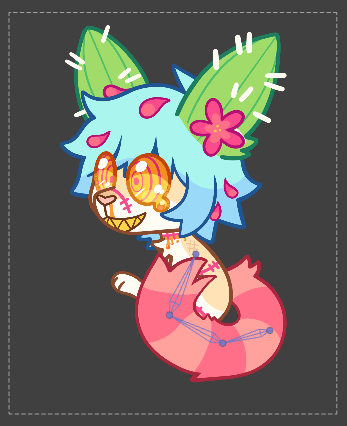
As for the flag... that's harder to explain, I don't remember how I did it very well 😢 I think I basically did the same thing as with the tail but I had to look up gifs and videos of flags to see how they move. I also had to use liquify to smooth out some of the frames so that the flag didn't look pointy/angular instead of wavy. I remember it was really hard to animate haha
I hope this helps at least a little! Sorry if anything sounds weird, english isn't my main language
This user is not visible to guests.
Hello, sorry for the late reply! It's no problem! Was it this icon? [link] / [transparent version] let me know if these are not the right ones!
![[link]](https://toyhou.se/~r?q=https%3A%2F%2Fcdn.discordapp.com%2Fattachments%2F784074539562434620%2F1093007951230414918%2Fpixelsetter_icon.gif)
![[transparent version]](https://toyhou.se/~r?q=https%3A%2F%2Fcdn.discordapp.com%2Fattachments%2F784074539562434620%2F1093009046379974747%2Fpixelsetter_icon_transparent.gif)
This user is not visible to guests.
thank you so much! for smooth lines I don't have many tips aside from using the stibilizer tool in your art program of choice 😖 I also personally feel like using a textured brush helps a lot to make nice looking lines! another thing that I think helps is using thick lines, I feel like it makes it easier to make smoother lines!
Sorry if this wasn't very helpful, if you have more questions feel free to ask!
I hate to be a bother, but what do you use to animate your 'tween' style animations? I've been trying to get into that animation style but have been having trouble finding the proper resources, and Google isn't of much help ^^'
It's not a bother, no worries! ^^ I use a free animation program called Synfig Studio! I really recommend watching tutorials on youtube if you want to learn how to use it though because it's not very intuitive/user friendly (I especially recommend a channel called YOW Khemardi) but it's a pretty good program once you get the hang of it imo! I hope that helps!
This user is not visible to guests.
My bad! I got too excited and forgot to check the rules here's my bulleting! https://toyhou.se/~bulletins/723422.world-discord-server-for-artists-nm-
Comments