Profile
Open Bundle
CSS by Pinky • Released March 21, 2026
Please be sure to read my rules & all the details of the layout before purchasing. There are no refunds because you did not read the rules.
Character Previews
User Previews
Bonus: Collab HTML
HTML that was designed by other users & edited to work with my Open CSS.
I did not design/create the original HTML, I only did the edits to make them work properly with this CSS.
Details
- CSS works on user profiles & character profiles.
- User CSS/HTML is compatible with default TH sections (featured comments, recent characters, etc)
- The top navigation bar has limited spaced; this layout will not work well with a lot of profile tabs. It also does not work with a sideblurb.
- CSS allows you to customize...
- Background image and/or color
- be sure to choose a background you can read text again
- Primary highlight color (for links & butttons)
- Secondary highlight color
- secondary color is what shows when you hover over primary buttonn & links
- TH header bar color
- Can set both the background & font color
- TH navigation bar color
- Can set both the background & font color
- Content area body color & font
- Bootstrap colors (faded background, danger, warning, etc)
- Width of the content area (default is 1000px)
- Color of text headers (h1 - h6 tags)
- by default this is set to the $font color
- Background image and/or color
- Includes switches for
- Choose the font case for the header case/navigation links (uppercase, lowercase or default)
- Corners can be sharp or round (4 options)
- Navbar stats (for gallery, favorites, etc) can be turned on/off
- Less commonly used sidebar links can be turned on/off
- Recent images on character pages can be turned on/off
- You can set an custom icon to appear next to the user or character name
- Choose an icon by searching the font awesome website (click here)
- Copy the unicode value for the icon
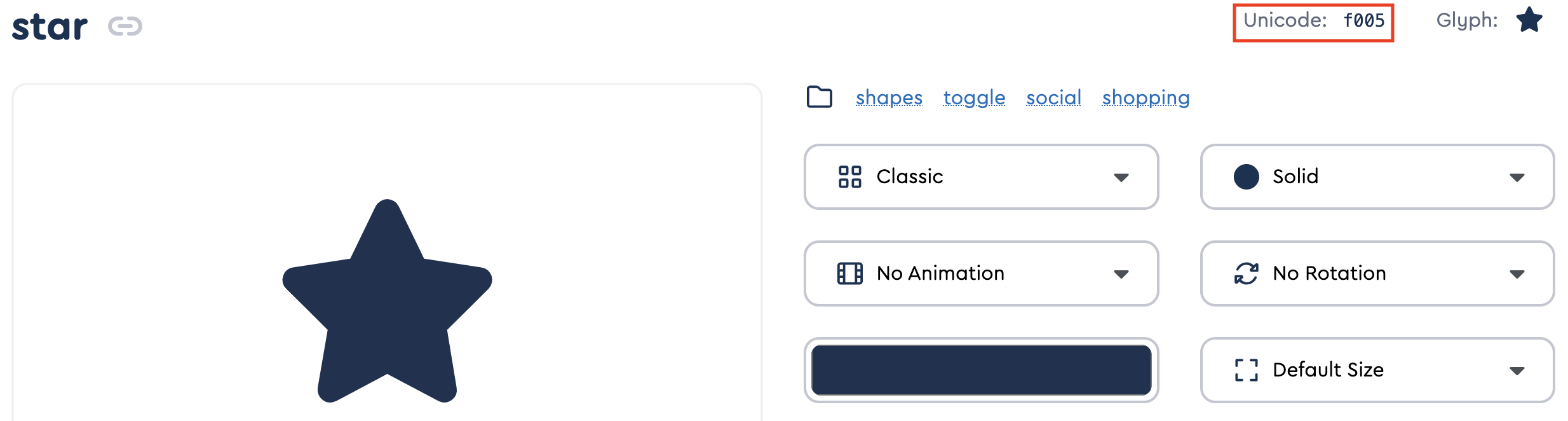
- Paste this into the indicated part of the css following the provided format
- Ex: would be: '\f005'
- you must include the \ and surround it with the single quotes
Credits


View More
Recent Images


