I’ve read the rules!
I’ve used this for my characters Beatrix and Raya and I love it! I plan to probably use it as a universal homepage for all of my characters. I wanted to ask if you allow frankensteining the code (with permission from other coders)? I didn’t see any mention of that in the code information so I wanted to ask!
Hello! With the new developments on ArtFight, I'd like to ask -- may this code be used off-site, assuming it fits within the character limit?
How do we add font awesome htmls onto it? In the spots that on it on time in the profile
i'm not sure what you mean, but if you go onto fontawesome.com and pick an icon, a menu/window will appear for you to copy/paste the html!
you can see so here: https://fontawesome.com/icons/heart?f=classic&s=solid
if i say something like "change fa-heart to an icon of your choice", that means i want you to change ONLY the icon (fa-heart), not the styling (fa-solid) unless you are familiar with fontawesome
This user is not visible to guests.
This is my favorite code! I use it for almost all of my favorite OCs. Thank you for making such cool and practical codes!
I really wanna use this as a user profile for the tabs but I cannot replace the content in it without it breaking,is there any way I can fix this?have a nice day <3
is it possible, w the cc ver, to change the color of the text in likes/dislikes? I’ve tried everywhere around <li> yet it hasn’t worked-
adjust the 50% found in the progress bars! the lower the percentage is, you decrease it and vice versa ovo)b
Sorry im asking too much how do i add image? Do i need a code of it? And how to change font colours?
to add an image: right-click on an image and "copy image address" (or anything similar, NOT "copy image"); alternatively, if you are on an ipad, you can hold the image down (if it's in on a web browser) and slide it to a tab. then, paste it where appropriate in the code
you can change the font colour by using the custom coloured (CC) version of the code, and changing the #000 hexcode to another colour; on desktop, you can use ctrl/cmmd + f in the code editor to change it but you'll manually have to find it on the ipad/mobile ^^

This user is not visible to guests.
This user is not visible to guests.
This user is not visible to guests.
If you want to change the colours of the links, add style="color:#HEXCODE" in the <a href=""> group! So like this:
<a class="rounded-0 p-2 border-0 card btn-block active bg-faded" style="color:#000" data-toggle="tab" href="#one">
<i class="fas fa-id-card"></i>
<span class="mt-2" style="letter-spacing:.5px;">profile</span>
</a>
Hope that works!
Hiya! I absolutely adore this code and used it for https://toyhou.se/11213941.kopi , but I am a beginner at TH coding and have no idea how to change the colors of the fonts/bg to fit the theme.
The text-white is too bright, but the text-dark is too muddy, so I wanted to try to give it a custom color if I could! How would I do this? I tried something like < div style="color:purple"> from the coding resources page you linked, but when I coded it, it messed with the formatting.
Hello! Are you looking to just change the colour of the header (where your character name is + quote)? :] It's strange that the color:purple isn't working for you but it's possible that you formatted it wrong. Right now, I can see that you're trying to make it green and so I'll go with that:
At Line 20 (or around there), replace <div class="text-green"> with <div style="color:#HEXCODE"> and see if that works better for you! Of course, replace HEXCODE with an actual hexcode for a custom coloured header! If the text is difficult to read either way, consider using a different background!
Hope that helps!
Is it possible to edit the code to get another tab for like background-? Mostly asking as i don't know how to exactly do it..
It’s possible; you’d need to add an extra tab and an extra tab pane for the background content!
I’m off to somewhere right now so I can’t extensively help but AviCode has a lovely tutorial that you can follow on how to add more tabs!
Please consider doing trial and error on a private character profile/tab so that in the event that something breaks, the original info isn’t lost! ^-^)9
Ah i see!! I was wondering if it was a thing of copy and pasting a certain thing So i read the tutortial and if im correct, if i copy one tab that isn't the active one, and edit it a bit, it should work fine with everything-?
And sorry to bother with another question, but do you somehow know how you would make like Uhm..
How the first tab profile box has the age, n such
Be able to turn into a description scroll box ?
I've figured out the tab stuff but i can't figure out how to make the description fit inside the box while scrolling..i tried to center align the text and thought it would work but it doesnt
This was the character i tested the coding out and my problem in the backstory tab
My understanding is that you would like to turn the basic info into a normal, scrollable textbox like seen in this code's history tab?
All you have to do is go to Line 90 where it says <div class="row no-gutters"> and delete everything until Line 131. Then, under the <!---------- [ INFO ] ---------->, add this:<div class="text-muted">
<p>Lorem ipsum dolor sit amet, consectetur adipiscing elit, sed do eiusmod tempor incididunt ut labore et dolore magna aliqua. Euismod quis viverra nibh cras pulvinar.</p>
<p>Nunc sed velit dignissim sodales ut eu sem. Porta non pulvinar neque laoreet suspendisse interdum. Blandit aliquam etiam erat velit scelerisque in dictum non.</p>
<p>A scelerisque purus semper eget duis. Ut sem nulla pharetra diam sit. Eu non diam phasellus vestibulum. Morbi tincidunt ornare massa eget egestas purus viverra. Facilisi nullam vehicula ipsum a arcu cursus. Pharetra vel turpis nunc eget lorem dolor sed.</p>
</div>
I don't know if you wanted to delete the AESTHETICS as well, but you pretty much delete it too. If you can see little arrows on the side of the numbers (when on Code Editor), you can click them to "collapse" the coding group and delete that to make the process a little easier. If you're still struggling, I highly suggest heading to the Help Forum instead! :]
hey there! i used this code for https://toyhou.se/10797530.faol-n and planning to use it for other characters. i'm trying to change the font to a more medieval font (Luminari) since he's in a medieval setting. am i stuck with the default font in the code or could i do something about it?
This user's account has been closed.
Hey there! I’m a little confused on what you’re asking but I’ll try and cover things about images. I’m away from my computer right now so I can’t check but ensure that you have WYSIWYG off and Code editor on when you’re adding images in! Essential step. Best done on desktop.
Anyways, are you saying that you’re unable to find photos for the background? Head over to Unsplash for high quality and free photos! As for the OC picture, any image should fit in there, regardless of size! Though, if you don’t have a picture, you can always use an aesthetic photo from Unsplash instead as a placeholder. ^^
When getting the image link, right-click and select “Copy image address”, then paste where appropriate. Hope this helps!
This user's account has been closed.
Even if the image was too big, I coded it so that any size would fit it, regardless if it was 200px or 3000px :0
Also, I just had a check and it seems that you have WYSIWYG on, or at least used it for editing. Please refer to this guide if you'd like to continue using codes and restart the profile IF you're still struggling to input the images in. Visually, it seems functional but you can't edit further if you want backgrounds.
This user's account has been closed.
Thanks for that! I've found out why the images are faulty! The reason why the images do not work is that somehow, bits of the background code have been deleted. This may have happened when you used WYSIWYG.
Where it says background:; (Line 16) or background-image:; (in [RIGHT BOX], around Line 35) should actually be background:url(LINK OF IMAGE URL');
Please replace the above with that! Also, the first line of code, be sure to add background-size:cover; afterwards. This is what makes the image spread so that it covers the code, regardless of size. After you do that, put in the image url in where it says 'LINK OF IMAGE URL' — INSIDE the brackets! Have a look below:
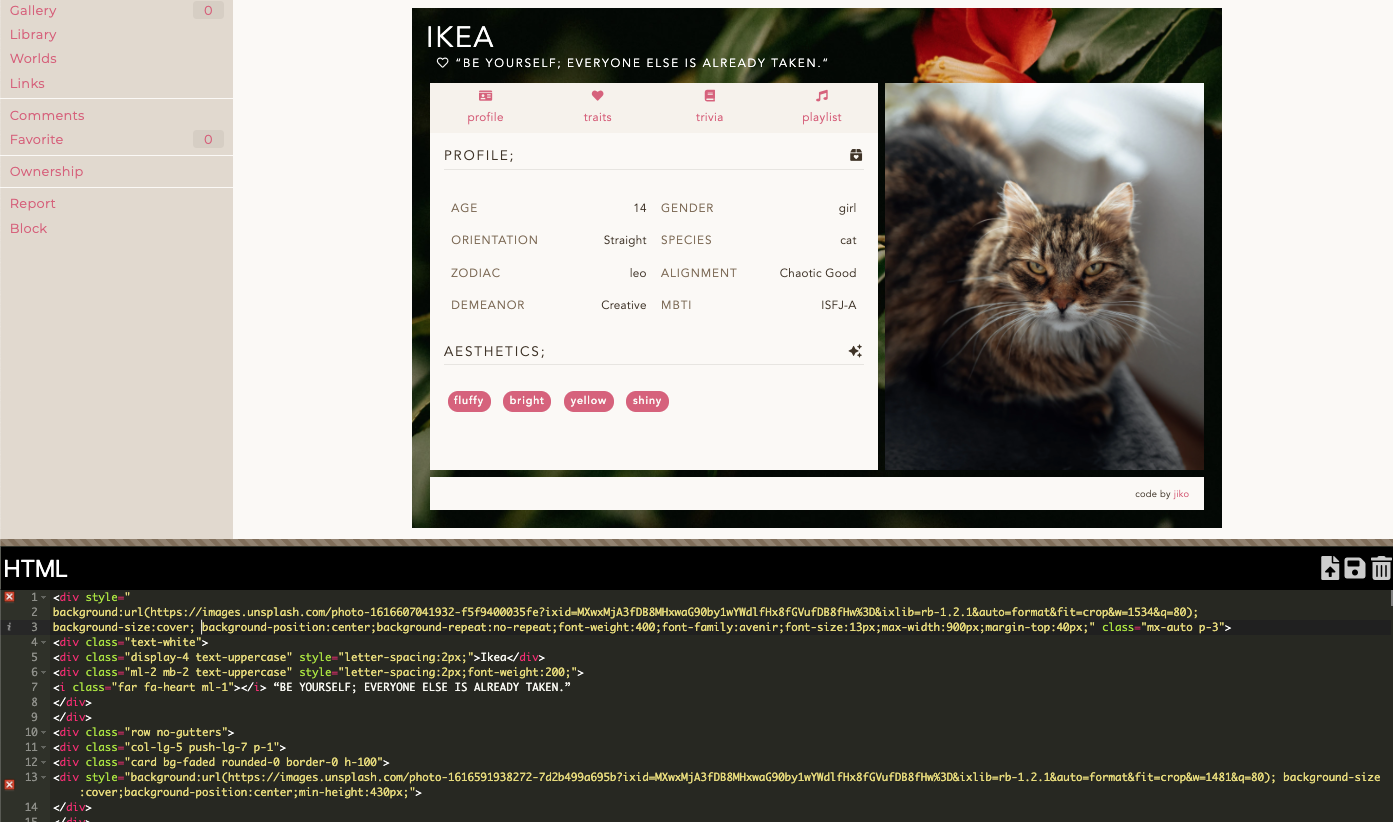 Excuse the blurriness, my bad LMAO
It may look different from how it may be set out in your code but take note of how it should look in order for the images to appear. As long as you follow my instructions, it should all come along fine ^^
is it just me or is there a </div> missing below the info section? =^= for me the layout was messed up and then i added the </div> (idk what compelled me to do that- i know nothing of coding) and then the page worked
If "the info section" is referring to the basic info under the profile tabs, I've checked both the BS and CC versions and both codes seem to be working fine? <:0 If you have added more information, a missing <div> may have gone astray which might explain that.
i've got two extra bullets on the profile page so maybe that's it? again, zero knowledge of coding on my end so i've got no clue sdfkdfskjdj
this isn't related but i found this code via someone else using it and i remember wanting to write down a backstory i have no idea why i didn't use another one but one of my character's backstories is so long that it's probably a good thing i stuck with this one & i've kiiiiinda changed my mind on that one pfft
actually
could you tell me how to remove the aesthetics section? since i don't really know what to do with it-
You know how there’s little arrows on the side that collapses groups of code to minimise space? If you click on the arrow that is in line with the AESTHETICS sections (Line 154) then delete it, that should rid of it correctly :]
It’ll look something like:
<!—— AESTHETIC ——>
<div class="mt-4 text-lowercase" style="font-size:15px; letter-spacing:2px;"> ↔ </div>
Delete the bold bit in the code and you’re good!
Hi again I just noticed that the word 'dislikes' on the template is misspelled as 'disikes' 👁
[ F2U ] Noxious's Comments